Mobile House မန္ဘာ မ်ား ေက်းဇူး ၿပဳ ၿပီး www.mobilehouse.co.nr မွ တိုက္ ရိုက္ ၀င္ေပး ပါ ရန္ ႏွင္႔ အသစ္ တင္ သမွ် ကို သိရွိ ေစရန္
https://www.facebook.com/MobileHouseServiceCentre
မွာ Like လုပ္ ေပး ၾက ပါ ....

Friday, December 7, 2012

BIG! Full Screen Caller ID Pro v2.2.4 APK


Beautify your caller ID screen!


BIG! Full Screen Caller ID Pro play.google.com.screencallerkey
Set a full-screen photo for your friends and enjoy vivid and high definition caller photos.
Connect with Facebook to download friends photos.
Doesn't work with MIUI ROM - they block third party apps of this type.

Features:
  • connect with facebook, and download full-screen photos automatically(and browse albums!),
  • customize caller ID screen content,
  • switch between caller screen Themes, choose click or slider,
  • choose full screen caller ID for all or only a few contacts,
  • full screen caller for incoming calls,
  • full screen caller for outgoing calls.
Themes Editor
  1. go to Themes,
  2. select and edit,
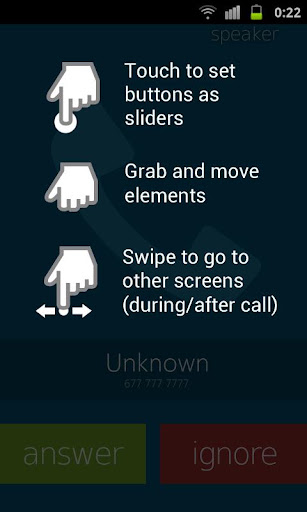
  3. move buttons by holding and dragging,
  4. switch to slider with a single click on a button (FIRST you need to drag a button to the edge of the screen)
  5. change default contact photo from the MENU button,
  6. switch to other states of a call by swiping left or right,
  7. reset to default from the MENU button
What's in this version : (Updated : Nov 23, 2012)
  • Screen dim fix for some devices,
  • Minor improvements,
  • Chinese added
Required Android O/S : 2.1+

Screenshots :


Download : 1.5 RAR
ဆက္ဖတ္ရန္>>>

Puffin Web Browser v2.3.7113 APK


Puffin Web Browser is the fastest web browser on the Android platform!


Puffin Web Browser play.google.com.cloudmosa.puffin
Puffin Web Browser is the premium version in the Puffin web browser family.
Puffin Web Browser is a wicked fast web browser. With the help of cloud servers, Puffin Web Browser brings the desktop web browsing experience to tablets and smartphones.
It renders the full versions of web pages quickly and reliably. It also supports Flash with excellent performance on iPads and iPhones.

Puffin Web Browser (version 1.0 as a paid app) was first launched in December 2010, and Puffin Web Browser Free (version 2.0 as a free app) was first launched in December 2011. Version 1.0 was a good proof-of-concept and version 2.0 is a major algorithm breakthrough. The new Puffin is super-fast in loading, panning, and zooming of web pages.

By June 2012, 1.5M Puffins were downloaded, with 800K for the paid version. Puffin is widely accepted globally and ranked as #1 paid iPad Utility in more than 10 countries. According to Apple’s App Store Rewind, Puffin was ranked #2 among all Japan’s paid iPad apps in 2011, outselling Angry Bird HD.

Highlights on the differences of the Puffin Free and the Puffin Web Browser:

Puffin Free will be search and ads sponsored

The choice of the default search engine is subject to change, and content ads may be displayed alongside with the web pages

 Puffin Free is feature restricted
Expensive features (on the server side) may be suspended temporarily on the free version to reduce operating cost

Puffin Free is on the leading edge
New and experimental features will be available on the free version sooner than on the paid version

Puffin Free is a preview of the Puffin Web Browser
During the evaluation period (14 days), the free version has the full feature set of the paid version

Puffin Free does not support Flash
Flash videos and games will not play after the eval period. Nevertheless, HTML5 videos and games will be fully supported
We are constantly adding features and improving stability of the product. We would love to hear from you! The best way to reach us is to post on our Facebook page so we can provide you timely assistance.

Features:

SPEED
  • Render the full versions of web pages extremely fast through cloud computing
TABS
  • ulti-tab UI to switch tabs between web pages with a single tap
OTHERS
  • Bookmark
  • Search suggest
  • Popup blocker
  • Top sites
Limitations:
  • Geo is US since our data centers are in US. Users outside US may not be able to view their local geo-restricted contents
What's in this version : (Updated : Dec 4, 2012)
  • Support download file to device.
  • New drag-n-drop gesture. Tap and hold on screen, start dragging after blue circle appears.
  • Improves Flash play smoothly and battery life.
  • Fix bug of multiple users on android 4.2.
  • Improve scrolling performance on nexus 10.
  • Add setting to disable quick control.
Required Android O/S : 2.2+

Screenshots :


Download : 6Mb APK
ဆက္ဖတ္ရန္>>>
Easy Uninstaller Pro v1.3.2 APK


Simplist & fastest uninstall tool for android!


Easy Uninstaller Pro
Easy & fastest uninstall tool.
Easy Uninstaller is a tool to uninstall apps for android phones. It is quit easy to use, you can select multiple apps that you want to uninstall, and click "Uninstall Selected Apps" button to uninstall them. Easy Uninstaller also support app search & sort. 
Type the keyword in the textbox in the top to search the app that you want to uninstall. Click "Menu"->"Sort" to sort the apps in many sort types. Long click on specified app, you will get a poped up context menu to provide more options. You can view app details by click "Application Details", you can share app by click "Share", and you can search the app in the google market by click "Search in Google Market".

Features:
  • Batch uninstall
  • Fast uninstall by one click
  • Show app name,version,update time,size
  • Search app by name
  • Various sort mode
  • App share
  • Search in Google Market
  • AD free
Easy Uninstaller cannot uninstall pre-installed apps in the system because it is limited by the system machenism.

What's in this version : (Updated : Nov 19, 2012)
  • Mark selected line
Required Android O/S : 2.1+

Screenshots :


Download : 225Kb APK
ဆက္ဖတ္ရန္>>>

Mobile Counter Pro - 3G, WIFI v2.6 APK

Mobile Counter Pro - 3G, WIFI v2.6 APK


Application to count network traffic (GSM/CDMA/WIFI)!


Mobile Counter Pro - 3G, WIFI
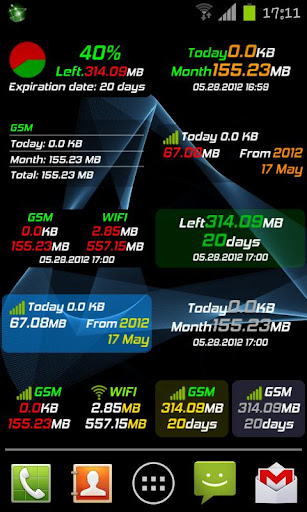
Mobile Counter(3G, WiFi, network traffic) - application to count network data GSM/CDMA/WIFI
Languages support: English, German, Slovak, Polish, Chinese, Romanian, French, Italian, Portuguese, Russian, Czech

Calculation types:
  • Standard counting(default)
  • Enable/Disable rounding in blocks (e.g to 100KB for session)
  • Enable/Disable separately round outgoing and incoming transfer to block of data
  • Disable couting outgoing(sent) transfer
Similar application to 3G watchdog, netCounter, netTraffic, network traffic,
Application without ADS and for free. Extended functionality has been added for users who donate application.

You decide how worth/useful this application is for you, so you can donate with value you want New  functionality for users who donate application:

Features:
  • More widgets 2X1(WIFI, transfer limits, billing period)
  • More widgets 1X1(GSM, WIFI, transfer limits, billing period)
  • New styles for notification bar (limit transfer, mobile GSM/CDMA, billing period)
  • Transfer used by application (req. android>2.1)
  • Export/Import data to SD card
  • Billing period calculation
  • Option to not counting sent transfer
  • Option to set alerts when transfer limit less than ... (in MB) will expire in ... (days)
  • Option to enable vibration when transfer limit will be exceeded
  • Option to set first day in week (Saturday, Sunday, Monday)
  • Show application icon in notification only when enable GSM/CDMA/WIFI
  • Set expiration period in days, weeks, months
  • Option to count separately transfer for one WIFI SSID e.g to count hotspot traffic
  • New statistics (for billing period, WIFI SSID)
  • Option to add not used transfer from last period to next
What's in this version : (Updated : Dec 5, 2012)
  • Add information in main app window about days for plan
  • Add separate counting for roaming traffic
  • Add Arabic language
  • Fixed bugs
Required Android O/S : 2.3+

Screenshots :
     
Download : 3740Kb APK
ဆက္ဖတ္ရန္>>>

မိုဘိုင္းဖုန္းမ်ား အင္တာနက္သံုးစြဲမႈကို Time Based Charging စနစ္ကို ဆက္လက္သံုးစြဲမည့္ အစီအစဥ္ေၾကညာျခင္း

  မီဒီယာမ်ားႏွင့္ ျမန္မာ့ ဆက္သြယ္ေရး လုပ္ငန္းတို႔ ေတြ႔ဆံုေဆြးေႏြး ညွိနႈိင္းမွဳနွင့္ ျပည္သူလူထု မိုဘိုင္းဖုန္း အင္တာနက္ကို ေစ်းႏႈန္း သက္သာစြာႏွင့္ ပိုမို တြင္က်ယ္စြာ အသံုးျပဳႏိုင္ ေရးတို႔ အတြက္ ယခုေၾကညာထားသည့္ Volume Based Charging စနစ္ထက္ ပိုမိုေကာင္းမြန္စြာႏွင့္ ေစ်းႏႈန္း သက္သာစြာ သံုးစြဲႏိုင္မည့္ နည္းလမ္းမ်ားကို အေသး စိတ္ထပ္မံ စိစစ္လ်က္ရွိပါသည္။

သို႔ပါ၍ ယင္းသို႔စိစစ္ေနစဥ္အတြင္း လက္ရွိအသံုးျပဳေနသည့္ Time Based Charging စနစ္ကိုသာ ဆက္လက္သံုးစြဲသြားမည္ျဖစ္ပါသည္။ အေသးစိတ္ ထပ္မံစိစစ္ရရွိသည့္ ႏႈန္းထားသစ္ကို 1-1-2013 ရက္ေန႔မွ စ၍ အသံုးျပဳႏိုင္ရန္ စီစဥ္ေဆာင္ရြက္သြားမည္ျဖစ္ပါေၾကာင္း အသိေပး ေၾကညာအပ္ပါသည္။

ျမန္မာ့ဆက္သြယ္ေရးလုပ္ငန္း


ဆက္ဖတ္ရန္>>>

Huawei U9200/P1 အတြက္ Android version 4.2 ရၿပီ

Huawei U9200/P1 CM10.1 (Android 4.2)


ROM name   cm_viva_tenfar_anzhi_atx_v2.0
  Android version   4.2
  Based version   CM10 2012 11 28 Source transplant adapter compile
  Fit models   Huawei U9200 P1
   support   http://www.mobilehouse.co.nr
 Published    2012.12.8


တစ္ ခု ခု အဆင္ မေၿပ ရင္ ၿပန္လည္ ၿပင္ဆင္ ႏိုင္ ရန္  ေကာ႔မန္႔ ေပးၿခင္း ၿဖင္႔ ကူညီ ေပးပါရန္ ။


 Download Here


android version 4.2


...

ဆက္ဖတ္ရန္>>>

Thursday, December 6, 2012

Huawei U8815-1 အတြက္ ICS offical version


HUAWEI G300 firmware(U8815-1,Android 4.0,V100R001C00B948CUSTC388D001,Singapore-BP)


Download Here


....
ဆက္ဖတ္ရန္>>>

T8828 root မရ ေသး ပါ ။

ေန႕ တိုင္း ေမးေန ၾက လို႔ T8828 ေတာင္ မုန္း လာ ၿပီ ။T8828 root လုပ္ မရ ေသးပါဘူး ဗ်ာ။ ရတာ နဲ႔ တန္း တင္ ေပးသြား ပါမယ္ ။ေလာေလာ ဆယ္ ကၽႊန္ေတာ္ တင္ေပးထား တဲ႔ ၿမန္မာလို ရ တဲ႔ ေဆာ႔၀္ ေလး ေတြ နဲ႔ အရင္ သံုး ထား လိုက္ ပါ ။ China phone root မရ တဲ႕ သူေတြ လဲ နည္းတူ ပါ ပဲ ၿမန္မာလို ရ တဲ႔ ေဆာ႔၀္ ေလး ေတြ နဲ႔  ေက်နပ္ လိုက္ပါခင္ဗ်ာ  ။


အားလံုး ကိုေက်းဇူး တင္ ပါတယ္ ။

 Admin -  ရဲရင္႔ေအာင္
ဆက္ဖတ္ရန္>>>

Wednesday, December 5, 2012

HTC Desire HD and HTC Inspire root လုပ္နည္း


 HTC က s-off မလုပ္ ထားရင္ Root လုပ္ ဖို႔ မလြယ္ ကူ ပါ ဘူး ။ အေကာင္း ဆံုး အၾကံ ေပး ခ်င္ တာ ေတာ႔ ဆိုင္ မွာ လုပ္ လိုက္ ပါ ။ ေလ႔ လာ ခ်င္ သူ ေတြ အတြက္ အဆင္ေၿပ ဆံုးနည္းလမ္း  ေတာ႔ တင္ ေပး လိုက္ ပါ တယ္ ။
တစ္ခုခု ၿဖစ္ ရင္ လုပ္ တဲ႔ သူ ေၾကာင္႔ ေနာ္ ။ Good Luckly ........
AAHK will work on Inspires on AT&T’s latest ROM, 3.20.502.52 only after following the steps outlined here:   http://tau.shadowchild.nl/attn1/?p=88 .

Warnings:
  • If your PC environment is not ready to run this kit, there is a good chance your device will not boot properly until you fix your PC or switch to another and re-run the hack kit from the partial boot. READ THIS ENTIRE POST and READ THE EFFEN MANUAL! There is no substitute for READING for COMPREHENSION
  • Do NOT use earlier versions Ace Hack Kit (12.x and lower) on Inspire or DHD devices shipped with Gingerbread.
  • Do NOT attempt to downgrade a Inspire or DHD shipped with Gingerbread with a Froyo RUU.
  • Do NOT attempt to install earlier ENG HBOOTs on these models. AAHK now has Hboots that safely support fastboot image flashing.
  • Doing this WILL severely degrade bootloader performance on Inspires and DHDs and causes issues trying to install RUUs. In other words, it WILL jam you up. (Note: Issue confirmed on later DHDs – ignore at your own risk).
  • Sense 3, including those with RELOCKED HTC BOOTLOADERS (NOTE: NOT UNLOCKED – MUST BE LOCKED OR RELOCKED) is auto-detected in hack step. Option is given to download a GB RUU and downgrade or abort. This WILL wipe data.
#include <std_disclaimer.h>
/*
  • Your warranty is now void.
  • I am not responsible for bricked devices, dead SD cards,
  • thermonuclear war, or you getting fired because you can’t tether. Please
  • do some research if you have any concerns about features included in this
  • TOOL before running it! YOU are choosing to make these modifications, and if
  • you point the finger at me for messing up your device, I will laugh at you.
*/
(Disclaimer borrowed heavily from cyanogenmod)
Features:
  • COMPLETELY INTEGRATED/INVISIBLE GOLD CARD PROCESS
  • Custom AAHK Bootloaders support popular ENG S-OFF functions for both Sense 2 and Sense 3 partition layouts
  • Only ONE menu step – HACK ACE
  • No ROM downgrade required (only radio/kernel) for devices not running sense 3
  • The original ROM is retained (except when downgrade from Sense3-GB is required)
  • No wiping data for devices not running sense 3
  • Rom is fully functional (yes, inc wifi)
  • Fully rooted with insecure boot image (supports adb remount for rw system)
  • Busybox manager app installed
  • Radio S-Off, superCid & carrier sim unlock
  • Correct Radio is automagically restored for HSPA+ operation
  • Clockworkmod Recovery included
  • All known Inspire/DHD builds supported
  • Easy return to stock for SOME builds (See the Effen Manual – not all carrier RUUs are available)

Notes:
  • Please do NOT run the hack step if you are already S-OFF AND are running a custom ROM. It’s pointless, and while it won’t brick you, you can get jammed up a bit. This is for stock devices only.
  • You MUST read the ENTIRE EFFEN MANUAL in order to run the hack kit.
  • Do NOT try to run this from a VM – particularly VirtualBox. You WILL get jammed up and may wind up flashing an RUU to recover, losing data in the process.
  • After kernel downgrade – video is lost on boot – this is okay as adb is working and can be used to finish the process. If the process fails, it can be restarted once the PC environment is corrected. When the process completes successfully, everything is restored and fully working.
  • Youtube videos are neat demos, but they make poor guides. READ THE EFFEN MANUAL. “There is no substitute for reading for comprehension.” – GenePoole
  • Make sure you extract the hack kit to your pc maintaining the directory structure in the archive you downloaded. The docs will be in the root directory of the unarchived kit, as will the scripts. READ THE EFFEN MANUAL.
  • I can’t believe that so many people are asking where the effen manual is. THE EFFEN MANUAL IS IN THE EFFEN HACK KIT.
  • This kit should work fine on HTC Inspire and HTC Desire HD Software versions below 3.06.405.1 which require the radio/kernel downgrade before a root exploit is available.
Windows Prep:
  • IMPORTANT – disable all malware (Antivirus detection etc) detection before unarchiving the hack kit. Keep it off thoughout the hack kit processes. Many Windows malware detection programs report false positives, deleting or binding critical files required by the process.
  • IMPORTANT – Remove or disable all services and daemons you can, particulary anything Apple, blackberry, PDAnet, Microsoft Mobile, anything USB not required for this task, any resource hogs. Also disconnect all un-needed USB devices and USB HUBs.
  • Remove HTC Sync and drivers.
  • Only after completing the above steps, install the drivers contained in the Hack Kit (see the Effen Manual) BEFORE plugging in the phone.
  • Connect the phone to the computer via a USB port connected to the system board – not a front panel port or a hub or extention port.
  • Verify successful android device driver installation in device manager.
Issues during downgrade:
  • IMPORTANT: BEFORE SWITCHING FROM DISK DRIVE TO CHARGE ONLY MODE, ALWAYS EJECT THE SDCARD WITH PC SOFTWARE TO FLUSH WRITE BUFFERS AND AVOID CORRUPTING THE SDCARD.
  • model ID incorrect update fail – this is because your goldcard is not working.
  • READ THE EFFEN MANUAL. Reading is fundamental.
Download:
Note: AAHK filename uses ddmmyyyy naming convention.
aahk-11092012.zip
md5: 5727960aa167b305b8f3561ffbbb1360
ဆက္ဖတ္ရန္>>>

Tuesday, December 4, 2012

Smart Phone မ်ားတြင္ အသံုးျပဳသည့္ အစင္းရာ၊ အျခစ္ရာ ခံနိဳင္ေသာ နည္းပညာ


Corning Gorilla Glass 2 (Smart Phone မ်ား၏ ေနာက္ကြယ္မွ သူရဲေကာင္း)

ကၽြန္ဳပ္တို႔ ေန႔စဥ္ အသံုးျပဳေနေသာ Mobile Phone မ်ားဟာ ျခစ္ရာ၊ စင္းရာ ခံနိဳင္ရည္ ရွိလာခဲ့ပါၿပီ။ သာမာန္ အခၽြန္မ်ားနဲ႔ ထိခိုက္မိရင္ေတာင္ ဘာအစင္းရာမွ မျဖစ္ေအာင္ မာေၾကာလာၾကၿပီ ျဖစ္ပါတယ္။

အဲ့လို ထိလြယ္ရွလြယ္တဲ့ Mobile Phone ေတြကို အၾကမ္းခံနိဳင္ေအာင္ ထုတ္လုပ္သူေတြက နည္းလမ္းေတြရွာ ၾကသလို နည္းပညာေတြ အဆင့္အတန္း ျမင့္မားလာျခင္းေတြကလဲ အၾကမ္းပတမ္းခံတဲ့ Device ေတြ ထြက္ေပၚလာေအာင္ ပံ့ပိုးကူညီေပးခဲ့ၾကတာ ျဖစ္ပါတယ္။

Touch Screen ေခတ္ကို ေရာက္လာတဲ့ အခါမွာေတာ့ Mobile Phone တစ္လံုးရဲ့ အဓိက အစိတ္အပိုင္းဟာ Glass Display ျဖစ္လာခဲ့ပါတယ္။ Glass မွန္နဲ႔ လုပ္ထားတာ ျဖစ္တဲ့အတြက္ Screen ေတြဟာ အလြန္ကိုပဲ အထိအခိုက္လြယ္ပါတယ္။ သာမန္ Glass ေတြဆိုရင္ အ၀တ္နဲ႔ ပြတ္ရင္ပဲ ၾကာရင္ ပြန္းလာတာ ေတြ႕ရမွာ ျဖစ္ပါတယ္။ ကၽြနဳ္ပ္တို႔ ကိုင္ေနတဲ့ ဖံုးေတြဟာလဲ အလိုမ်ိဳး သာမာန္ Glass ေတြသာ ျဖစ္ခဲ့မယ္ဆိုရင္ ဘယ္ေလာက္မွ တာရည္ အသံုးခံမွာ မဟုတ္ပါဘူး။


ဒါေပမဲ့ သင္ေရာ သတိထားမိပါရဲ့လား၊ သင့္ရဲ့ ေနာက္ဆံုး ၀ယ္ယူထားတဲ့ Mobile Phone Glass ဟာ Screen Guard မကပ္မိဘဲ ထားမိရင္ေတာင္ ေတာ္ရံုတန္ရံု အစင္းမထင္ေတာ့တာ သင္ သတိထားမိပါရဲ့လား။ တကယ္ပဲ Mobile Phone ေတြရဲ့ Screen ေတြဟာ အၾကမ္းခံနိဳင္လာပါၿပီ။

Scratch Resist Glass ေတြကို သံုးလာတဲ့အတြက္ ကၽြန္ဳပ္တို႔ရဲ့ Smart Phone ေတြဟာ ထိရာ ရွရာေတြကို ခံနိဳင္ရည္ ရွိလာခဲ့တာ ျဖစ္ပါတယ္။ အဆိုပါ Scratch Resistance Glass ေတြ ထုတ္လုပ္မွဳမွာ နာမည္ႀကီးတဲ့ Company ကေတာ့ Corning  ျဖစ္ပါတယ္။ သူဟာ နာမည္ႀကီး Mobile Devices ေတြရဲ့ ဖန္သားေတြကို ကာကြယ္ေပးဖို႔ နည္းပညာေတြကို တစိုက္မက္မက္ တီထြင္လာခဲ့တာျဖစ္ပါတယ္။

အခုဆိုရင္ ဒိတ္ဒိတ္ၾကဲ ဖံုးေတြမွာ Corning က ထုတ္တဲ့ Gorilla Glass Version 1 or 2 ကို အသံုးျပဳေနၾကၿပီ ျဖစ္ပါတယ္။

33 မ်ိဳးေသာ နာမည္ႀကီး Brand ေတြဟာ သူတုိ႔ရဲ့ Product ေတြမွာ Gorilla Glass ေတြကို အသံုးျပဳထားတယ္လို႔ Corning ရဲ့ တရား၀င္ List မွာ ေဖာ္ျပထားတာေတြ႕ရပါတယ္။

Gorilla Glass ဟာ ဖိအားဒါဏ္၊ အစင္းဒါဏ္ ေတြကို ၿပိဳင္ဘက္ Chemical နည္းအားျဖင့္ မာေၾကာေအာင္ လုပ္ထားတဲ့ ဖန္သားေတြထပ္ ပိုခံနိဳင္တယ္လို႔ ဆိုပါတယ္။ ေကြးညြတ္မွဳမွာလဲ သာလြန္ေကာင္းမြန္ၿပီး၊ အဆင္းရာေတြ ျဖစ္တယ္ဆိုရင္လဲ အနည္းအက်ဥ္းေလာက္ပဲ ျဖစ္တယ္လို႔ ဆိုပါတယ္။

http://www.corninggorillaglass.com/sites/all/files/GG2%20PI%20Sheet%20Rev%20b_050912.pdf

ေနာက္ဆံုး တီထြင္ထားတဲ့ Gorilla 2 ကေတာ့ 20% ပိုမို ပါးလြာၿပီး၊ ပိုအၾကမ္းခံလာတယ္လို႔ ဆိုပါတယ္။

Gorilla Glass ေတြကို HTC, Samsung အစရွိတဲ့ Company ေတြရဲ့ Product ေတြမွာ သံုးပါတယ္။ သို႔ေပမဲ့ ထူးျခားတာကေတာ့ Apple Product ေတြမွာ Corning က နည္းပညာကို အသံုးျပဳထားတယ္လို႔ တရား၀င္ ထုတ္ေဖာ္ေျပာဆိုထားတာ မရွိတာကို ေတြ႕ရပါတယ္။ တကယ္ေတာ့ Steve Jobs ဟာ အစင္းဒါဏ္ခံနိဳင္တဲ့ Glass Display ေတြကို ထုတ္လုပ္ဖို႔ Corning နဲ႔ ပူးေပါင္းခဲ့ေၾကာင္း သူရဲ့ ေနာက္ဆံုး ကိုယ္ေရးစာအုပ္မွာ ပါလာခဲ့တာ ေတြ႕ရပါတယ္။ အဲ့ဒီေၾကာင့္ပဲ Apple Device ေတြဟာ Gorilla Glass ေတြ သံုးထားနိဳင္ေၾကာင္း သံုးသပ္ေျပာဆိုၾကပါတယ္။ Corning မွလည္း သူ႔ရဲ့ တရား၀င္ အသံုးျပဳသူ List မွာ Apple ကို ထည့္မထားတာ ဟာလည္း သို႔ေလာ သို႔ေလာ ေတြးစရာေတြ ျဖစ္ကုန္ပါတယ္။ ဒါေပမဲ့ ေသခ်ာတာကေတာ့ Apple ရဲ့ Glass Screen ေတြဟာ အထိအခိုက္ လြယ္တာပဲ ျဖစ္ပါတယ္။

Gorilla Glass ေတြ ဟာ Microsoft Surface မွာလဲ အသံုးျပဳသြားမွာ ျဖစ္ပါတယ္။

Corning Official Vision on Youtube
"A Day Made of Glass 2"
http://www.youtube.com/watch?v=jZkHpNnXLB0&feature=youtu.be

ေဖာ္ျပပါ Video ကို ၾကည့္မိတဲ့ အခါမွာေတာ့ Corning ရဲ့ Glass Concepts ေတြဟာ Microsoft ကေနၿပီး စဥ္းစားထားတဲ့ Future Vision 2020 ေတြနဲ႔ သြားၿပီး ဆင္တူေနတာ ေတြ႕ရပါတယ္။

Microsoft Future Vision 2020
http://www.youtube.com/watch?v=55p3vNCF4JQ

Samsung Galaxy S3 သည္လည္း Gorilla Glass ကို အသံုးျပဳထားၿပီး၊ အေတာ္အသင့္ကို အစင္းဒါဏ္ ခံနိဳင္တာ ေတြ႕ရပါတယ္။

Galaxy S3 Scratch Test
http://www.youtube.com/watch?v=fhoF564nJ_Q
ေဖာ္ျပပါ Video ကလုိမ်ိဳး မိမိရဲ့ Screen ဟာ အၾကမ္းခံမခံ စမ္းသပ္ၾကည့္နိဳင္ပါတယ္။ Genuine Product ျဖစ္မယ္ဆိုပါက အမွန္တကယ္ပဲ ခံနိဳင္ရည္ ရွိမွာ ျဖစ္ပါတယ္။

စာဖတ္သူ အသံုးျပဳေနတဲ့ Product ကလည္း Gorilla Glass သံုးထားျခင္း ရွိမရွိ သိလိုပါက ေအာက္ပါလင့္မွာ သြားေရာက္ ၾကည့္ရွဳနိဳင္ပါတယ္။

Gorilla Glass အသံုးျပဳထားေသာ Product မ်ား
http://www.corninggorillaglass.com/products-with-gorilla/full-products-list

Gorilla Glass Demo
http://bcove.me/5ywumwc9

TSJ Tech Team

http://www.corninggorillaglass.com
ဆက္ဖတ္ရန္>>>